 ABBYY FineReader Professional 11.0.289
Screenshots of ABBYY FineReader Professional

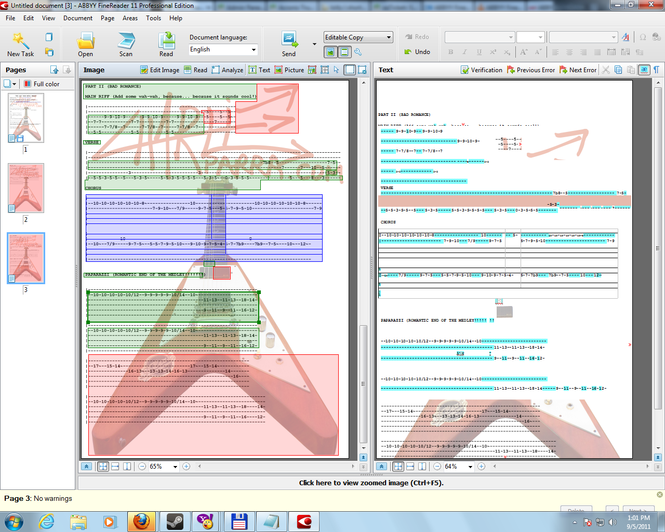

ABBYY FineReader Professional Editor's Review
ABBYY FineReader is an optical character recognition software that is able to scan documents and readily converting images of documents such as scans, photographs, and PDF files into editable and searchable electronic formats. It’s the best alternative to manual retyping, because its text recognition system delivers precision accuracy in converting almost any type of printed document including books, magazine articles with complex layouts, tables and spreadsheets, and even faxes.
FineReader 11 brings the OCR technology to a new level due to a new black-and-white mode that is said to speed up to 45 percent the document processing . To streamline document conversion processes, FineReader further improves its unique capability to reconstruct native formatting of multi-page documents and also supports easy creation of electronic books in the most popular formats.
In addition to Microsoft Word documents, ABBYY FineReader 11 now adds support for OpenOffice.org Writer (ODT) files. When saving to PDF, the application intelligently identifies and reproduces the document’s content outline bookmarks with live links for better navigation and reading.
The new version delivers significant improvements in the detection of vertical headers, as well as margin notes, diagrams, tables, and styles, minimizing the effort typically required for manual correction. A new feature allows users to convert paper documents and images of text to a variety of formats supported by e-book readers, tablet PCs and smartphones, including the newly added Electronic Publication (.ePub) and FictionBook (.fb2) formats. Additionally, texts converted with ABBYY FineReader 11 can be sent directly to the users of Amazon Kindle account.
Pluses: support for OpenOffice documents, faster scanning process, improved detection of complex layouts, tables, images and spreadsheets, added support for a variety of formats supported by e-book readers;
Drawbacks/flaws: the trial version offers only one process per document and it will expire after 15 days usage or when 50 pages have been processed;
In conclusion: a powerful solution for scanning and converting documents from their physical form on paper to an electronic editable form without the need of rewriting. Suitable for libraries, archives and even logistics.
ABBYY FineReader Professional Publisher's Description
ABBYY FineReader is a an intelligent OCR software for creating editable and searchable files from scanned paper documents, PDFs and digital photos. ABBYY FineReader gives you the power to unlock data in documents and images and transform them into manageable and accessible information.
The key features of the product include:
- Outstanding OCR Accuracy...
Other Languages
Look for Similar Items by Category
Feedback
- If you need help or have a question, contact us
- Would you like to update this product info?
- Is there any feedback you would like to provide? Click here
Beta and Old versions
Popular Downloads
-
 KaraFun Karaoke Player
2.6.2.0
KaraFun Karaoke Player
2.6.2.0
-
 Kundli
4.5
Kundli
4.5
-
 Macromedia Flash 8
8.0
Macromedia Flash 8
8.0
- FastSum 1.9
-
 FastSum Standard Edition
1.6
FastSum Standard Edition
1.6
-
 Cool Edit Pro
2.1.3097.0
Cool Edit Pro
2.1.3097.0
-
 Cheat Engine
6.8.1
Cheat Engine
6.8.1
-
 Hill Climb Racing
1.0
Hill Climb Racing
1.0
-
 My Talking Tom
1.0
My Talking Tom
1.0
-
 Tom VPN
2.2.8
Tom VPN
2.2.8
-
 Windows XP Service Pack 3
Build...
Windows XP Service Pack 3
Build...
-
 C-Free
5.0
C-Free
5.0
-
 GeoGebra
5.0.44
GeoGebra
5.0.44
-
 Netcut
2.1.4
Netcut
2.1.4
-
 Vidnoz AI
1.0.0
Vidnoz AI
1.0.0
-
 Vector on PC
1.0
Vector on PC
1.0
-
 Facebook Messenger
440.9.118.0
Facebook Messenger
440.9.118.0
-
 Grand Theft Auto: Vice City
1.0
Grand Theft Auto: Vice City
1.0
-
 Auto-Tune Evo VST
6.0.9.2
Auto-Tune Evo VST
6.0.9.2
-
 FormatFactory
4.3
FormatFactory
4.3